
All in One: Analog51 - Google Play
You'll be able to see results in few seconds.
Publisher Description
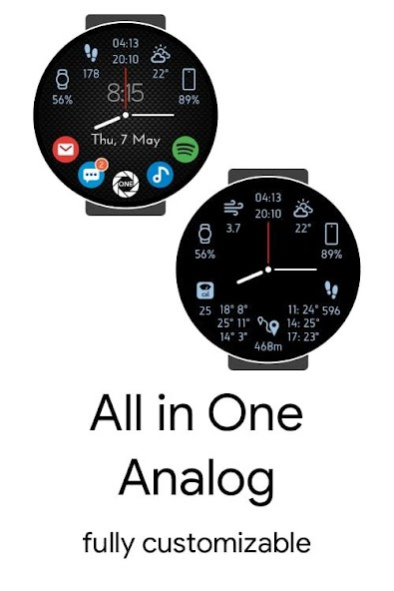

Watch face series -
All in One: Analog
2 in 1: Buy
AIO Analog or AIO Indigo
inside this app
and take second one for free.
Features:
• Imperial/Metric units (Fahrenheit + Miles / Celsius + Meters).
• Customizable app icons (1-5), to launch apps directly from your watch face.
• Customizable info icons (1-9): 4 - main mode + 5 - watch always on.
• Health data: Calories, Distance, Steps, Heart rate.
• Weather data: Precipitation, Pressure, Sunrise, Sunset, Temperature (High / Low), UV Index, Wind, Forecast 3 days, Forecast Today.
• Battery status (Watch & Phone).
• Moon phase.
• Notification count support.
• Customizable fonts.
• Customizable date formats.
• Customizable text & background colours.
Premium settings:
• Tap on the Smart Watch battery icon to open the settings page.
Free version is not customizable.
Important
: That the data is updated timely and regularly, please do follow
https://bit.ly/2kJODkm
for "AIO Analog", "Galaxy Watch PlugIn" ("Watch Active2 Plugin"), "Galaxy Wearable" and "Samsung Accessory Service" apps.
S Health:
• Because of smartwatch software limits, it is impossible to sync Calories, Distance and Steps data automatically at the begin. Calculation starts from the time you select the watch face. On the next day (at midnight) counters on the watch face and S Health will both synced to 0.
• On the Galaxy Watch series, the S Health app takes extra data from your phone.
Inside settings:
• 'BG' - background (show textured background). If 'off', shows coloured background.
• 'DT' - show digital time.
• 'hPa' - show pressure in hectoPascals, otherwise in inHg/mmHg.
Forecast 3 days
: High / Low temperature for tomorrow and next 2 days.
Forecast Today
: Temperature for next hours with 4 hours step (Time: Temp).
UV Index
(0-10): 1-3: Low, 4-5: Moderate, 6-7: High, 8-9: Very High, 10: Extreme.
Hidden in the app settings if it is not provided for current location.
Moon phases
: New, WxC (Waxing crescent), FQ (First quarter), WxG (Waxing gibbous), Full, WnG (Waning gibbous), LQ (Last quarter), WnC (Waning crescent).
Compatible with:
• Samsung Galaxy Watch
• Samsung Galaxy Watch Active
• Samsung Galaxy Watch Active 2
• Samsung Gear S3 Frontier
• Samsung Gear S3 Classic
• Samsung Gear Sport
• Samsung Gear S2
About All in One: Analog
The company that develops All in One: Analog is Shuisky. The latest version released by its developer is 51.
To install All in One: Analog on your Android device, just click the green Continue To App button above to start the installation process. The app is listed on our website since 2021-03-24 and was downloaded 0 times. We have already checked if the download link is safe, however for your own protection we recommend that you scan the downloaded app with your antivirus. Your antivirus may detect the All in One: Analog as malware as malware if the download link to shu.gear.aio.analog is broken.
How to install All in One: Analog on your Android device:
- Click on the Continue To App button on our website. This will redirect you to Google Play.
- Once the All in One: Analog is shown in the Google Play listing of your Android device, you can start its download and installation. Tap on the Install button located below the search bar and to the right of the app icon.
- A pop-up window with the permissions required by All in One: Analog will be shown. Click on Accept to continue the process.
- All in One: Analog will be downloaded onto your device, displaying a progress. Once the download completes, the installation will start and you'll get a notification after the installation is finished.
Program Details
System requirements
Download information
Pricing
Version History
version 51
posted on 2021-03-24
I am glad to present you a new, very useful app - "Baby Monitor" (Two-way voice communication, Sound and motion detectors, ...). Put your phone next to your child and watch him from your watch. Link inside this app (Samsung phones only).
If you have any issues, please contact with Samsung support
https://help.content.samsung.com/csweb/ticket/createQuestionTicket.do
Disclaimer
Official Google Play Link
We do not host All in One: Analog on our servers. We did not scan it for viruses, adware, spyware or other type of malware. This app is hosted by Google and passed their terms and conditions to be listed there. We recommend caution when installing it.
The Google Play link for All in One: Analog is provided to you by apps112.com without any warranties, representations or guarantees of any kind, so access it at your own risk.
If you have questions regarding this particular app contact the publisher directly. For questions about the functionalities of apps112.com contact us.
